My Work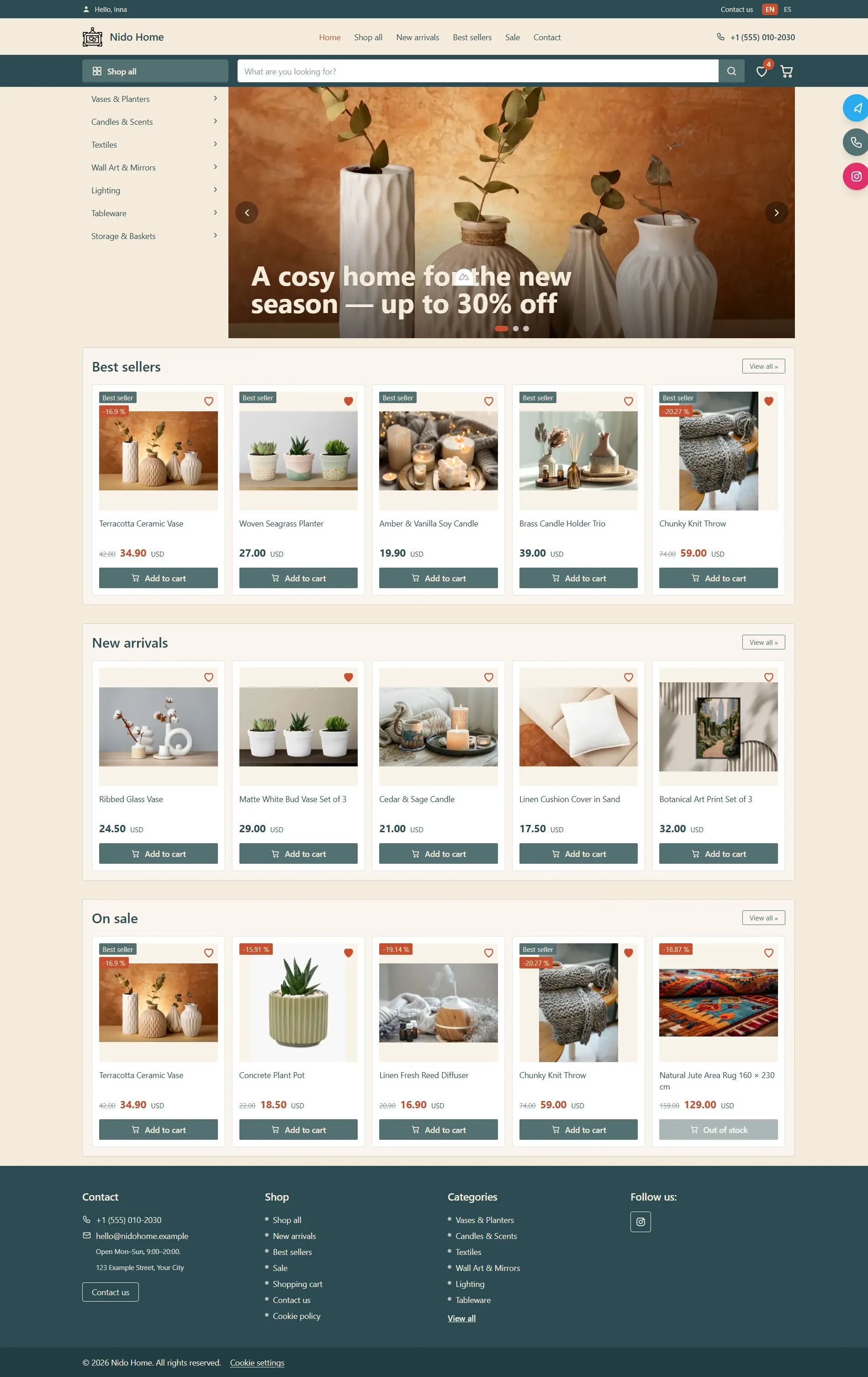
CustomFrom €1,500
Nido Home — E-Commerce Website for Home Goods
A modern and aesthetic e-commerce website designed for a home goods and decor brand, with a strong focus on shopping convenience, stylish visuals, and conversion rates.
The website showcases product catalogs, new arrivals, bestsellers, and promotional offers using a clean and structured layout. It features seamless category navigation, an interactive search bar, a wishlist, a shopping cart, multi-language support (EN / ES), and intuitive user interaction touchpoints so customers can easily find products and place orders.
The site is also equipped with a custom admin panel featuring built-in analytics (dashboard). This allows the business owner to fully manage the product catalog, orders, banners, home page sections, navigation menus, messages, customer reviews, SEO settings, and activity logs without requiring any technical knowledge.
Key Features:
• Style & Design: A minimalist and warm interface using pastel color tones, creating an atmosphere of comfort and harmony. The color palette, banners, and typography are fully customizable via the admin panel.
• Scalability & Flexibility: Perfect for both local boutique showrooms and large online retailers. You can easily add new product categories, configure discounts, set promotional badges (Best seller, Sale), and manage their display on the storefront.
• Full Content Management: The primary advantage is an intuitive, user-friendly admin panel with visual sales analytics, order status tracking, and visitor traffic reports, enabling full store management with zero coding skills required.
Tech Stack:
Built using cutting-edge technologies to ensure maximum performance, lightning-fast speed, and robust security for your online store:
✔ Nuxt.js (Vue.js) — Delivers ultra-fast page load times, smooth transitions, and flawless SEO optimization (SSR), which is critical for attracting new customers from search engines.
✔ Laravel — A reliable and powerful backend framework that ensures stable order processing even under high traffic loads, handling data security and API communications.
✔ Tailwind CSS & SCSS — Modern styling tools that guarantee a flawless responsive design across all screen sizes (mobile, tablet, desktop) and effortless brand style customization.
✔ MySQL — A high-performance database designed for fast storage and efficient processing of information regarding products, categories, customers, orders, and visitor activity.
Home Page
The Nido Home main page is designed as an effective tool to introduce users to the product assortment, promotional offers, and key categories. It combines seamless navigation with visual elegance, driving customer engagement from the moment they land on the site.
Key Sections & Functionality:
• Header & Navigation:
– Includes quick contact details, a language switcher (EN / ES), an interactive product search bar, a Wishlist icon, and a shopping cart.
– A dropdown side menu for categories ("Shop all") allows users to quickly navigate to specific product groups (vases, candles, textiles, lighting, etc.).
• Hero Banner Slider:
– A dynamic slider with full-width banners designed to highlight seasonal collections, sales, and special offers (e.g., up to 30% off). Fully manageable via the admin panel.
• Best Sellers:
– A showcase of the brand's most popular items. Product cards feature visual badges ("Best seller", discount percentages), a Wishlist toggle button, and a quick "Add to cart" CTA.
• New Arrivals:
– A dedicated section presenting the latest additions to the catalog, helping returning customers easily discover fresh trends and new products.
• On Sale:
– A specialized block for discounted items displaying original crossed-out prices, current promotional prices, and discount percentages. Out-of-stock items display an "Out of stock" status indicator.
• Footer:
– Features complete contact details (phone, email, address, operating hours), site navigation links, category list shortcuts, social media icons, and legal compliance info (cookie policy, copyright notice).
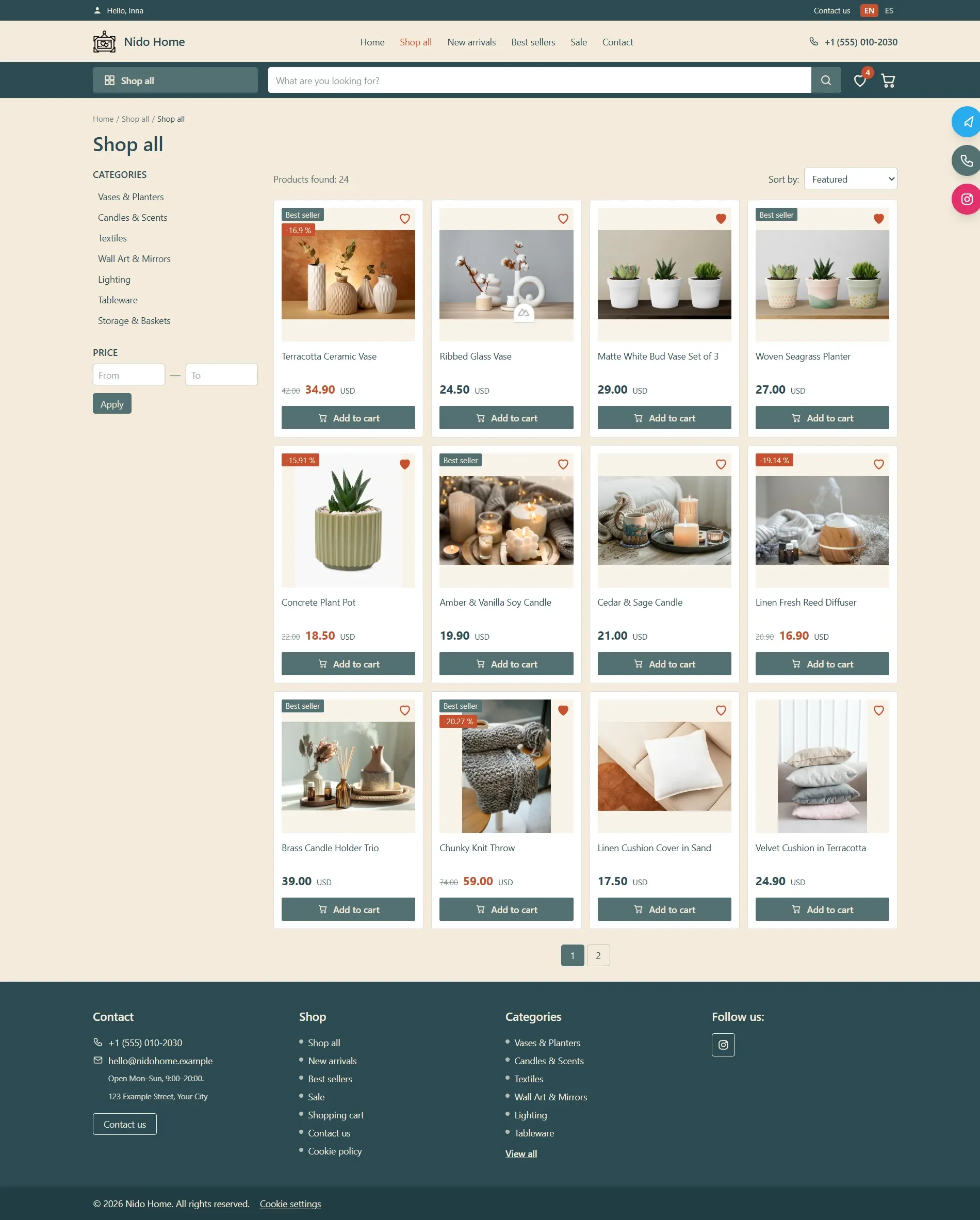
Catalog / Shop Page
The catalog page is designed for seamless browsing, filtering, and selection of products across the store's entire assortment. It offers users a functional interface equipped with flexible sorting and navigation tools.
Key Sections & Functionality:
• Breadcrumbs Navigation:
– Allows users to easily track their current location on the website and quickly navigate back to previous catalog levels.
• Sidebar Filters:
– Category Filter: Quick navigation across subcategories (Vases & Planters, Candles & Scents, Textiles, Wall Art & Mirrors, Lighting, Tableware, Storage & Baskets).
– Price Filter: Convenient price range input ("From / To") with an "Apply" button.
• Sorting & Product Count Bar:
– "Products found" counter displaying the exact number of matching items (e.g., 24).
– Sorting dropdown menu ("Sort by: Featured", price, novelty, etc.).
• Product Grid:
– Interactive product cards featuring images, titles, status badges ("Best seller", discount percentages), original and promotional prices.
– Wishlist toggle button (heart icon on each card) and a quick "Add to cart" CTA button.
• Pagination:
– Intuitive page navigation at the bottom of the grid for smooth browsing through large product catalogs.
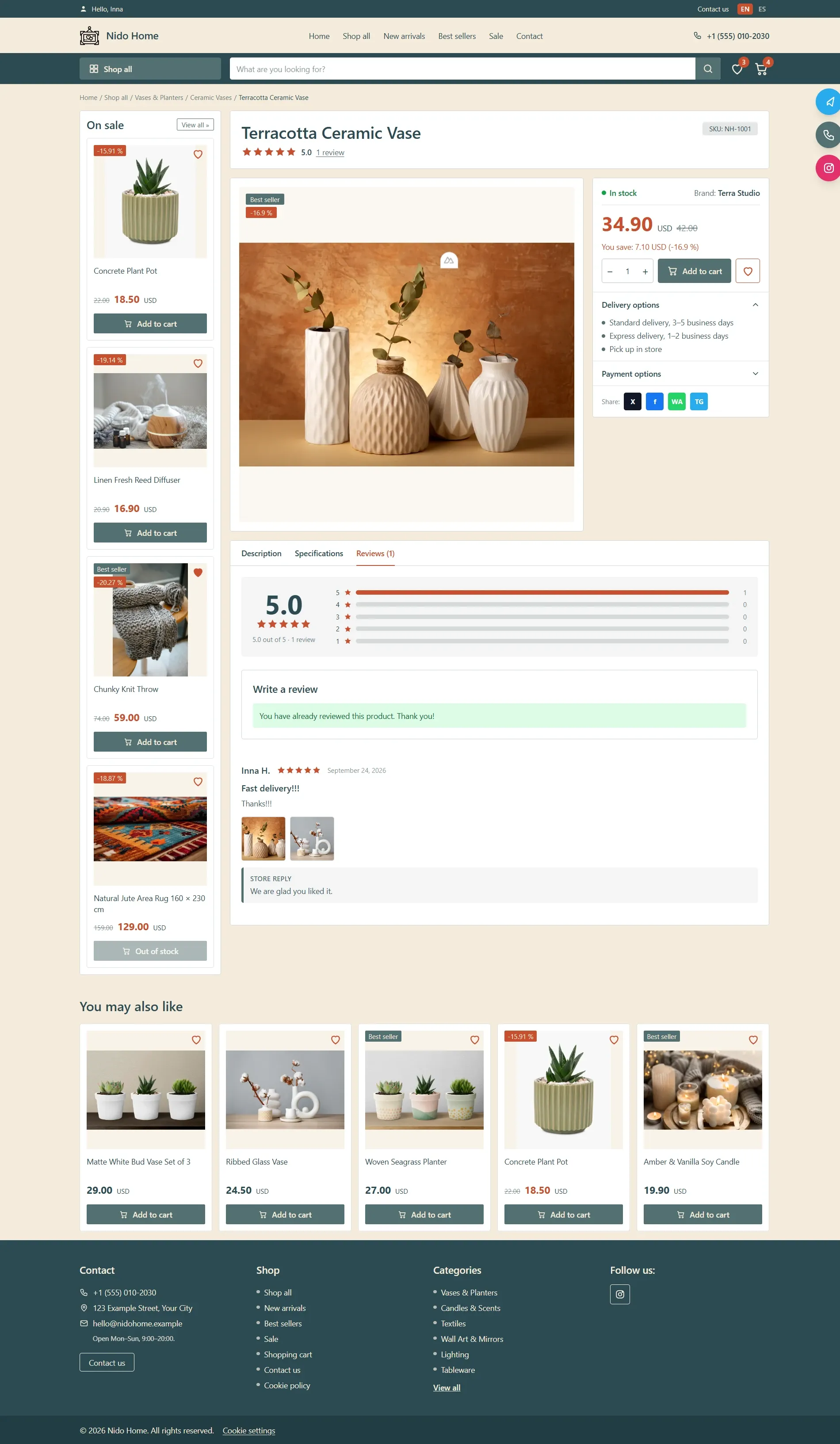
Product Page
The product page is engineered for maximum clarity and conversion rate. It brings together visual representation, detailed specifications, rich descriptive content, and a verified customer review system fully controlled via the admin panel.
Key Sections & Functionality:
• Visual Media Gallery:
– Interactive product viewer with a set of high-quality images from multiple angles, allowing customers to inspect materials, textures, and design details.
• Content Tabs:
– Description: Comprehensive storytelling text highlighting product features and aesthetic value.
– Specifications: Clean breakdown table with technical parameters, dimensions, materials, and product specs.
– Reviews: Verified customer feedback section with star ratings and detailed impressions.
• Authenticated Reviews & Moderation System:
– Review submission is restricted exclusively to registered users, preventing spam and ensuring genuine feedback.
– Full admin panel control: new submissions go directly to moderation ("Reviews awaiting moderation"). The store admin can approve, reject, or publish official store replies.
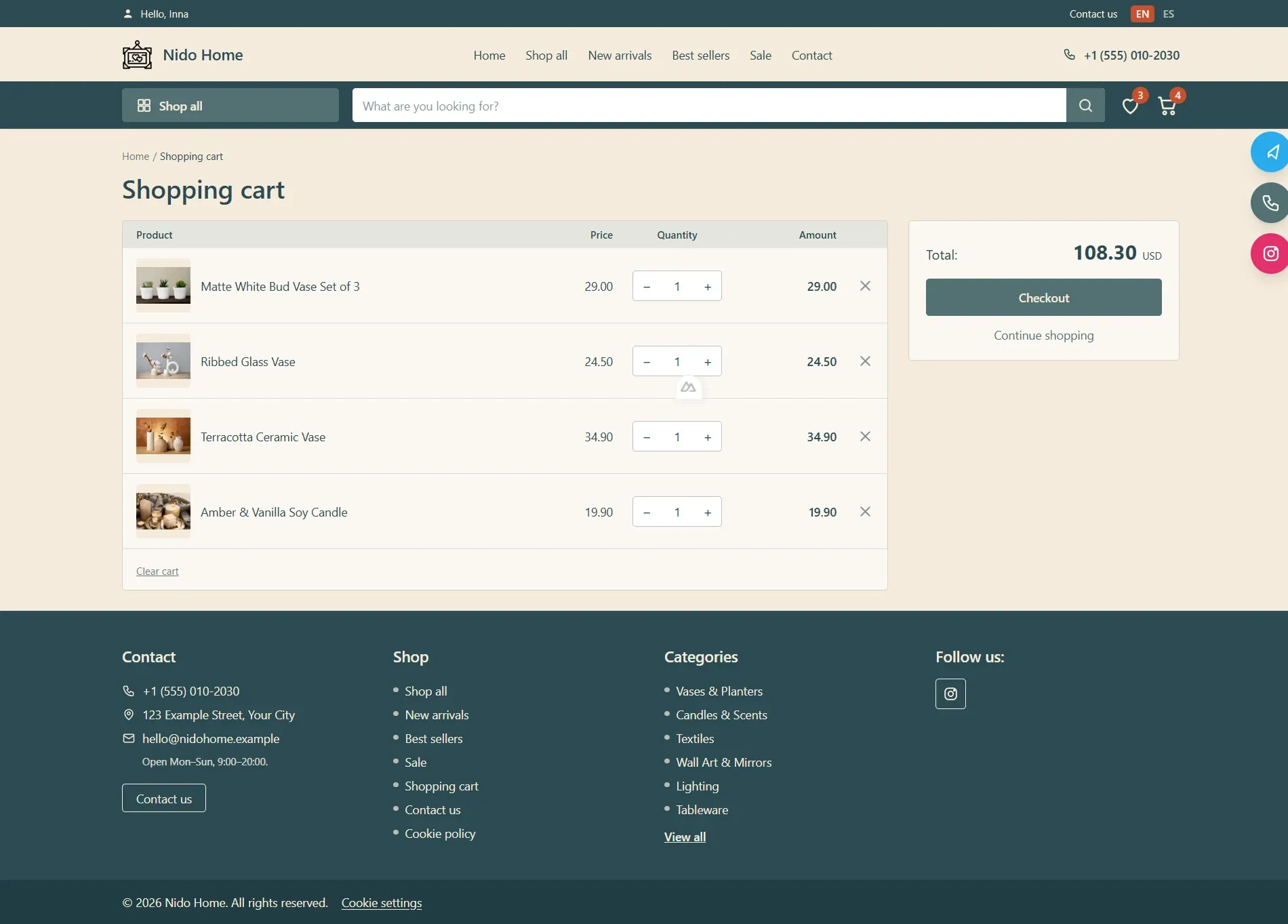
Shopping Cart Page
The shopping cart page provides a transparent and smooth order review process prior to checkout. It allows customers to easily manage selected items, and upon confirmation, the order is instantly routed directly to the admin panel for processing.
Key Sections & Functionality:
• Cart Items Table:
– Product thumbnail, item title, unit price, quantity selector ("– / +"), and line item total ("Amount").
– Single-item removal option (cross icon) and a full "Clear cart" feature.
• Order Summary & Checkout:
– Real-time calculation of the total amount ("Total: 108.30 USD").
– Primary "Checkout" action button initiating the order creation and transfer process.
– "Continue shopping" button for quick return to browsing the catalog.
• Admin Panel Integration:
– Upon successful checkout, the order is immediately transmitted to the "Orders" section of the admin panel, assigned a "New" status, and reflected in real-time sales analytics.
Contact Us Page
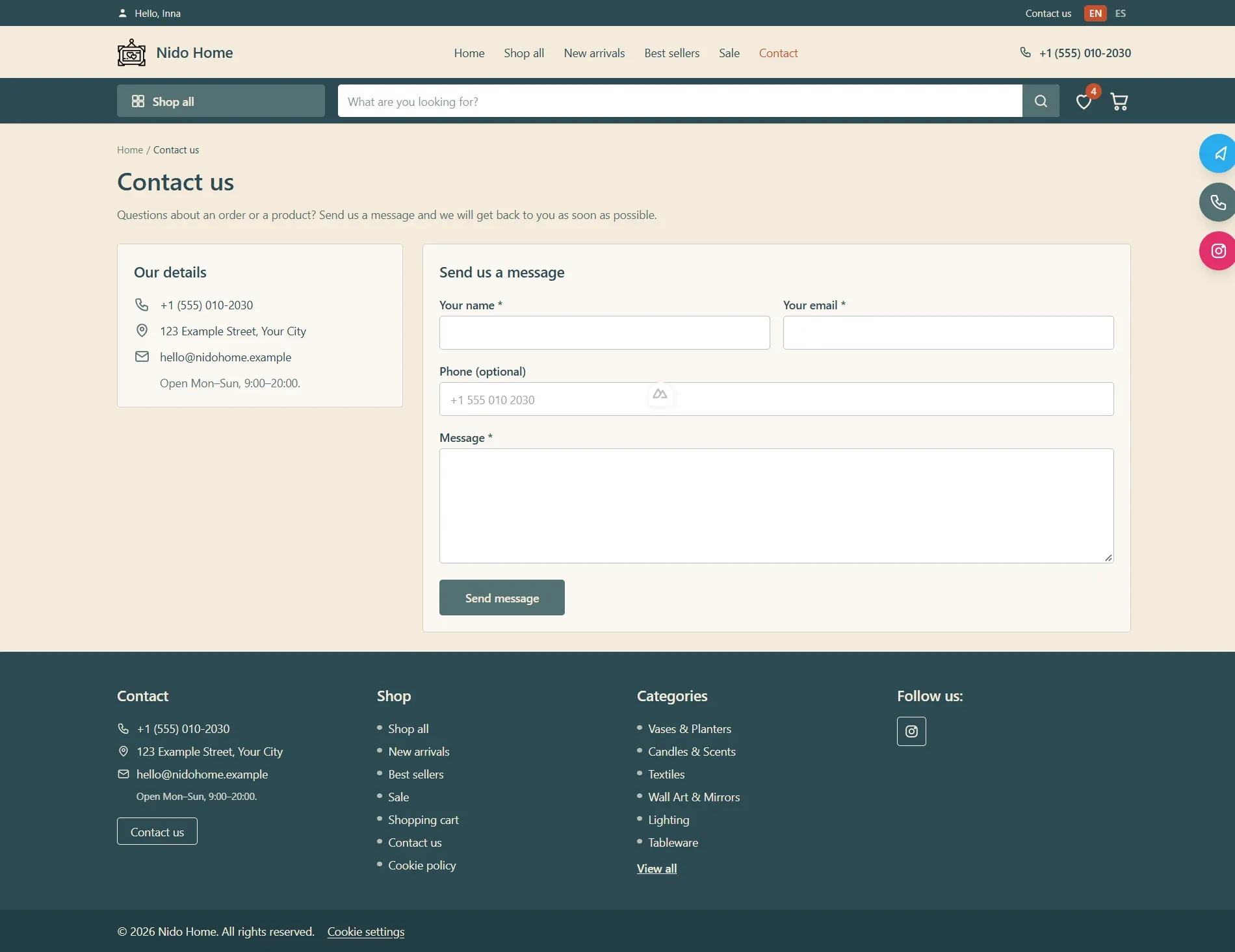
The Contact Us page provides a smooth and direct communication channel between customers and the store team. It features complete company details along with an interactive contact form, with messages routed directly to the admin panel.
Key Sections & Functionality:
• Contact Information (Our Details):
– Direct contact phone number ("+1 (555) 010-2030").
– Physical address of the store/showroom ("123 Example Street, Your City").
– Customer support email address ("hello@nidohome.example").
– Store working hours ("Open Mon–Sun, 9:00–20:00").
• Contact Form (Send Us a Message):
– Intuitive input fields for name ("Your name *"), email address ("Your email *"), optional phone number ("Phone (optional)"), and message content ("Message *").
– Primary submit button ("Send message") triggering the form submission.
• Admin Panel Integration:
– All incoming customer inquiries submitted via the form are instantly delivered to the "Messages" section of the admin panel for quick response management.